

Login Formating
Guemes Island Historical Society
How does one format the login text and features? I've selected a predefined layout and enabled login. Then under Typography I've turned on Navigation and the custom slider. Changing font size on the Custom screen does not do anything.

Toufiq
Accepted AnswerHi there,
Thank you for reaching out, and I apologize for any inconvenience caused by this oversight. Can you share your page URL to check the issue?
Best regards,
Toufiqur Rahman (Team Lead, Support)

Paul Frankowski
Accepted Answercustom slider ??
In Typography we don't have it. I guess you thought about "Custom" where you can add class names.
Guemes Island Historical Society
Accepted AnswerSorry for the confusion. I mistakenly assumed the custom button in Typography (below the Navigation option) applied to Navigation. (What does it apply to, by the way?)
I added login to the header by enabling login after selecting a predefined header and am looking for a way increase the font size.
Better yet, I'd like to have the login feature on the top bar but don't know how to do that either.
Paul Frankowski
Accepted AnswerShare:
- Link to site/page
- Link to image (mockup) to tell us exactly what is your goal. Like you would talk with builder team.
Guemes Island Historical Society
Accepted AnswerI don't know what you mean by 'builder team' or how to talk to them. It's just me trying to create a website. Here's a link to the home page: https://joomlagihs.guemesislandhistoricalsociety.org/
At the right, you'll see the login link. I want that to have a larger font.
Ideally it would be in the top bar, which I think is the black line between the header and body. When I had the Joomla login module there, the top bar was at the top, and the large login form always showed.
By the way, the logout option on the login link that you see doesn't work, but the home page disappears and a logout button appears in the middle of a large white band.
Paul Frankowski
Accepted Answer'Builder team' – my mistake, I should have used the American term 'construction team'.
Bigger font will not help to improve visibility, but button effect will.
Try that Custom CSS
.sp-sign-in {
  background: white;
  padding: 5px 10px;
  border-radius: 20px;
  border: 2px solid black;
  font-size: 22px;
}

.sp-sign-in:hover, .sp-sign-in:focus {
  border: 2px solid blue;
}
To get that (you see a difference, right)
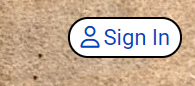
by default font-size was 20px, I set 22px, but you can use 24px
Paul Frankowski
Accepted AnswerAbout new postion, also possible, but ... first you have to disable current login. Then create a new Button using SPPB Module and publish it in top-bar position, probably top1.
If you have Custom Layout, in top-bar keep only one module position, for example, top1.
Paul Frankowski
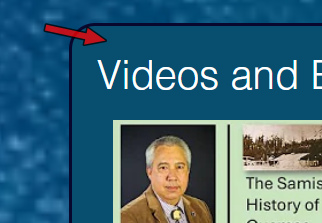
Accepted AnswerTo improve Web Accessibility (contrast level) I suggest using solid background color (dark navy) for columns
Paul Frankowski
Accepted AnswerBTW
Was there any hidden treasure or strange 'unsolved' mystery story about the Guemes Island?
If yes, text about it could help promote your site ;]
People don't search about stats, but 'blood & gold'.
Guemes Island Historical Society
Accepted AnswerThanks, Paul That CSS worked great. I changed the background to brown and it became transparent which is even better. But in retrospect, since only board members and volunteers will need to log in to access to certain lists, etc., the login method could be on a Volunteers page that solicits volunteers and has the login button.
I'll have to experiment with the top positions. There's two now: top1 and top2 that were there after installation of Helix and SPPB.
Thanks for the background suggestion; I'll try that out.
Gold and gore... Well, there's 'Smuggler Kelly', buried indigenous skulls, a murder in the channel, copper mine shares that were worthless, and the present day struggles with the County over ferry fares. All good ways to get our islanders interesed in the rest of our history.